Using Vue 3's Composition API script/setup tag
For a working example employing a typeahead package

Creative in general: amateur chef, officially rated chess expert, published poet. Web developer for the past 20-plus years, the more current half focused on the front end. Have worked five Vue.js projects since 2017.
In this article, we will review a Vue application that uses much of the Composition API's functionality, and in so doing we will not employ the Options API. Nor will we use the setup() function, but rather the following script and attribute pairing that is a substitute:
<script setup>
The above get compiled by Vue into a setup() function. The other functionality from Vue 3's Composition API (that is either different from, or not included in, Vue 2 and/or the Options API), in order of usage, is as follows:
Component registration
Consuming props (
defineProps)Making objects (or arrays)
reactivecomputeddefineEmitsref(the counterpart ofreactivefor "value types")
The definitive source of information for both the setup() function and its script tag substitute can be found at the following, respectively:
Component registration
Our application will be simple and the structure of its components is as follows
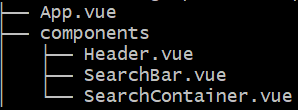
App.vue includes the Header and SearchContainer components:
<template>
  <Header :headerSvgDrawAttrs=headerSvgDrawAttrs />
  <SearchContainer />
</template>
You can see we are passing a prop into the Header component but we will speak to that further below. Rather, let's consider how easy it is to specify our components to use inside of <script setup>
<script setup>
import Header from "./components/Header.vue";
import SearchContainer from "./components/SearchContainer.vue";
...etc
That's it! Just import the components and use them in a template. No need to additionally specify a components option as in sometimes verbose the Options API.
defineProps
As for props, the technique for passing them to a component has stayed the same, but now we consume them in components using defineProps (to see the props being passed from one component's template, and used in another, you can view the source code on Github). The following is our Header component's entire script block, with one line commented out to show an alternative approach that may seem familiar from the Options API
<script setup>
<script setup>
import { defineProps } from "vue";
const props = defineProps({
  // headerSvgDrawAttrs: Array
  headerSvgDrawAttrs: {
    type: Array,
    required: true
  }
});
</script>
The props we are consuming are values for the d attributes of an SVG image. It's a contrived example but demonstrates the technique. To reiterate, consult the source code.
The SearchContainer component includes the SearchBar component, and the latter is where most of the functionality resides, including the usage of a typeahead package. So first let's turn our attention to the SearchBar.
From the imports at the top of <script setup> you can see the functionality from the Composition API that SearchBar uses, as well as an external package:
import { reactive, computed, defineEmits } from 'vue';
import SimpleTypeahead from "vue3-simple-typeahead";
reactive
The functionality from the Composition API is in the order I used them. Let's turn our attention first to reactive.
Using reactive lets us make arrays or objects ("reference types") reactive; in the Options API we would have specified them inside the data option. First, we declare the variable to make reactive:
const photos = reactive({data: []});
Then we populate photos with data from an API call:
(async () => {
    await fetch("https://jsonplaceholder.typicode.com/photos")
        .then(response => response.json())
        .then(json => photos.data = json);
})();
There is a reason I'm using an (async) IIFE here. If the await fetch() were at the top level inside the <script setup> tag such as in the example from https://vuejs.org/api/sfc-script-setup.html
`const post = await fetch(/api/post/1).then((r) => r.json())`
Then "the resulting code will be compiled as async setup()", and "async setup() must be used in combination with Suspense, which is currently still an experimental feature"
computed
I chose the jsonplaceholder's dummy photos API in particular because it returns 5000 results, and a large dataset justifies the technique I employ. Let's have a look at one of the 5000 objects that is returned:
  {
    "albumId": 1,
    "id": 1,
    "title": "accusamus beatae ad facilis cum similique qui sunt",
    "url": "https://via.placeholder.com/600/92c952",
    "thumbnailUrl": "https://via.placeholder.com/150/92c952"
  }
For the search with typeahead, I decided that the title field, despite being in "lorem ipsum" format, would be best, and by associating it with a photo url (I decided on the thumbnailUrl), when a selection is chosen, an image can be displayed. So we don't need all the fields, but more importantly, we don't want to continually use Array.prototype.find against the API data.
Without going into the ins and outs of big O notation, the one time I benchmarked the performance of using find, it was hundreds of times slower than accessing an object value by key. We will only be fetching the API data once, so a computed that transforms the array of objects, into an object, will only be executed the first time.
Moving on from the rationale, let's look at how we utilize computed with Vue 3's Composition API
const photoUrlsByTitle = computed(() => {
    return photos.data.reduce((accum, photoData) => {
        accum[photoData.title] = photoData.thumbnailUrl;
        return accum;
    }, {});
});
The above logic returns an object with 5000 entries such as
"et nulla beatae":"https://via.placeholder.com/150/4dc348"
Notice, that instead of all computeds being lumped together (whether we have one or many) as in the Options API, we declare each computed separately. The following is how the "vue-simple-typeahead" component is included in the SearchBar and how it specifies the keys of the object returned by the photoUrlsByTitle computed as its data attribute; you would have to install it with npm (you can google the package name) and you can see the import in the source code from the GitHub repository.
        <SimpleTypeahead
            placeholder="Title of thumbnail to display"
            :items="Object.keys(photoUrlsByTitle)"
            :minInputLength="3"
            @selectItem="handleSelectFromTypeAhead"
        >
        </SimpleTypeahead>
defineEmits
In Vue we follow the credo "props down, events up". We want to display the thumbnail corresponding to the title selected from the typeahead in the SearchBar's parent, the SearchContainer component. In the parent component's template block, when including the SearchBar, it specified a custom event, prepending by the at symbol, that the parent would listen for, the portion before the = being the event name, the portion after being the reference to the method that will be invoked when the event is received (more on this method further below in the section about ref)
<SearchBar @photoTitleSelected="updateThumbnailSrc" />
In the SearchBar this event can be defined, and emitted as follows:
    const emit = defineEmits(["photoTitleSelected"]);
    function handleSelectFromTypeAhead(selectedValue) {
        emit("photoTitleSelected", photoUrlsByTitle.value[selectedValue]);
    }
defineEmits specifies an array of events a component can emit (handleSelectFromTypeAhead is the name I chose for the function that would handle the @selectedItem event specified as an attribute of the typeahead component). The actual emit method specifies the event as the first argument and an optional data payload as the second argument. The name of the custom event we specify must match in three places:
When the child component is included in the parent's template
In
defineEmitsin the child, andIn the
emitmethod call from the child
NOTE
Something you may notice that in what we are passing as the data payload in emit, we are not referencing merely photoUrlsByTitle but rather it's value property. This is necessary anywhere in the setup() method (not just our emit), but not, by the way, in the template, where photoUrlsByTitle is sufficient. And note that indexing the object with our `selectedValue` argument, gets the thumbnail url based on the original API data.
When the event is emitted, the method associated with the event name in the parent controller gets called. Which brings us back to SearchContainer including its usage of ref
ref
ref is the counterpart to reactive but instead for value types, so strings, numbers and booleans (rather than objects and arrays). Below follows the entire template and script blocks from our SearchContainer component:
<template>
    <SearchBar @photoTitleSelected="updateThumbnailSrc" />
    <div class="thumbnail-placeholder">
        <img ref="thumbnailRef" src="">
    </div>
</template>

<script setup>
import SearchBar from "./SearchBar.vue";
import { ref } from 'vue';

const thumbnailRef = ref(null);
function updateThumbnailSrc(thumbnailUrl) {
    thumbnailRef.value.src = thumbnailUrl;
}
</script>
When this component traps the photoTitleSelected event emitted by its child, the updateThumbnailSrc method we have created will be invoked. That method uses the thumbnailRef declared above it.
Note that this matches the template ref declared on the img tag in the template. So ref serves two purposes in the Vue 3 Composition API. No longer can refs from the template be accessed using this.$refs (nor can much else be accessed using this with the Vue 3 Composition API, but that's a matter for another blog post).
Finally, the body of the updateThumbnailSrc custom event handler comprises a single line that updates the src attribute of the thumbnailRef (a reference to an img tag) with the thumbnailUrl argument that was passed by the child as the payload. Again we must do so by referring to thumbnailRef.value
Conclusion
We have not tried to cover every aspect of Vue 3's Composition API. Instead we hope that we have provided information about enough functionality to provide a stepping stone toward further honing your Vue 3 skills!